Pro. The compliance tools need Editorial Workflow Pro, with the free plugin version 1.2.0 or later.
Pro adds a tamper-evident log, filtered exports, scheduled exports, a retention policy that archives before it deletes, and a report of reviewer workload and bottlenecks.
The Compliance and Workload screens are open to workflow managers who can also audit: people with both sit_cwm_manage_workflows and sit_cwm_view_activity.
Before you start: the log signing key
Define the log signing key in wp-config.php. Without it the key sits in the database, and anyone with database access could rewrite the log and its hashes:
define( 'SIT_CWM_PRO_CHAIN_KEY', 'at least 32 random characters' );Rows signed before you add the constant stay only as strong as the old key. If you later replace the constant, list the old value in SIT_CWM_PRO_CHAIN_RETIRED_KEYS so those rows still verify.
Integrity
“Every log entry is signed into a chain, so a change or a gap shows up when you verify it.”
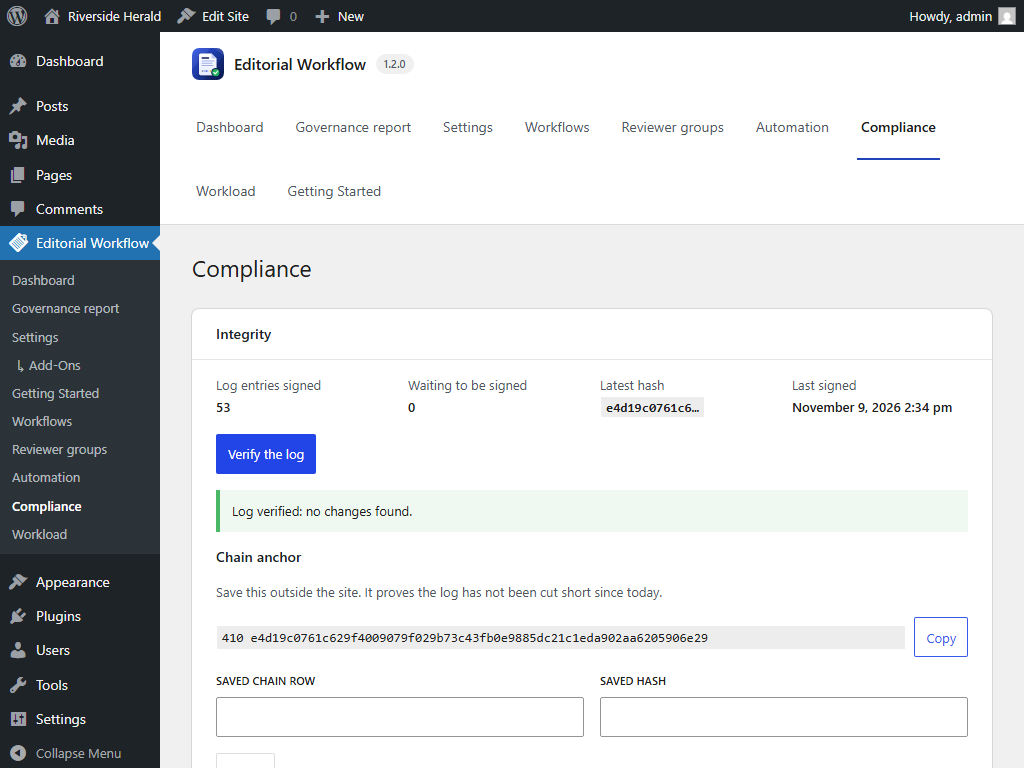
Go to Editorial Workflow  Compliance. The Integrity card shows Log entries signed, Waiting to be signed, the Latest hash and when the log was Last signed. Entries are signed in the background shortly after they are written.
Click Verify the log. Pro checks every entry against its signed copy. The result is either “Log verified: no changes found.” or a list of problems, each marked Changed, Missing, Signing key not found or Chain broken.
The chain anchor
“Save this outside the site. It proves the log has not been cut short since today.” Click Copy and keep it somewhere safe. To check it later, paste it into Saved chain row and Saved hash and click Check.
What the log proves
- With the key in
wp-config.php, a row changed or removed by someone with database access but not file access is detected, with one exception: the newest rows deleted together with their chain rows are only caught by comparing a saved anchor. - Anchors protect only what was saved outside the site, so keep the scheduled-export mails or copy the anchor.
- With the key in the database, the chain only detects edits by people without database access.
- It cannot detect changes made before a row was signed.
- Legitimate deletions (a permanent post delete, retention) are recorded and verify as ok.
- An approval and a sign-off each record the content hash, so the log shows exactly what they covered.
The chain proves that the log was not changed. It does not prove the log was true when written: someone with admin access can still act as anyone they can log in as.
Export
“Download the activity log as a CSV file, with each row’s chain hash. Leave a filter empty to include everything.”
On the Export tab, filter by From and To date, Post type, User id, Post id and Actions, then click Download CSV. Each row carries its chain_hash and chain_status after the free plugin’s columns.
Scheduled exports
“Store a copy of the log on a schedule, and see every file and export so far.”
- Set the Frequency: Off, Weekly or Monthly. “Each run stores the previous full period, and emails a link to everyone who can audit.”
- Set Files to keep, from 1 to 24 (default 12). “Older scheduled files are deleted. Archives are never deleted.”
The mail carries a link, never an attachment, and includes the chain anchor. Downloads need a login and audit access.
The list of stored files shows each file’s Kind (Manual, Scheduled or Archive), Date, Size and Rows, with Download and Verify. Verify reports Unchanged, Changed since it was archived or Missing.
Check that exports are private. Stored exports are kept in wp-content/uploads/sit-cwm-pro-exports/ and protected by .htaccess, which Nginx ignores. On Nginx, deny web access to that folder in the server configuration.
Retention
“Decide how long log rows stay in the database, and what happens to Pro’s data if Pro is deleted.”
- Turn on Archive and delete old rows.
- Set Keep rows for (months): “From 6 to 120 months.” The default is 24.
- Save, and confirm: “Rows older than N months will be archived to a file and then deleted from the database. The archive and a signed checkpoint are kept.”
Retention runs daily and deletes only what it can prove it archived:
- Export the oldest rows past the cutoff, at most 50,000 per run. Stop, deleting nothing, if the file is short or could not be written.
- Sign the log up to the newest archived row. Stop if it cannot.
- Delete exactly the archived rows.
- Record a checkpoint with the archive’s name and SHA-256.
Each row lands in exactly one archive, and archives are never rotated. The card shows the last run, for example “Finished: N archived, N deleted.” or “Stopped: the archive could not be written, so nothing was deleted.”
Uninstall
Delete Pro data when Pro is deleted is off by default. “Workflow history in the free plugin’s activity log is kept.” It can only be changed while the licence is active. When it is on, deleting Pro removes Pro’s tables (including the hash chain), its workflows, groups, channels, AI policy, settings and logs, and the export directory, including retention archives. Download any archives you need first: after this the log can no longer be verified.
Workload
Editorial Workflow  Workload shows open and overdue reviews, decisions, and time in each stage.
Without an active licence
The log, verification and manual exports keep working. Scheduled exports and retention pause, and you cannot change settings, until a licence is active.