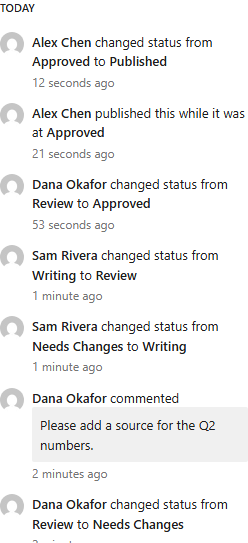
Dana reviews, Sam revises, Dana approves, Alex publishes.
- Dana opens the post. It is at Review, and publishing is locked until it is approved.
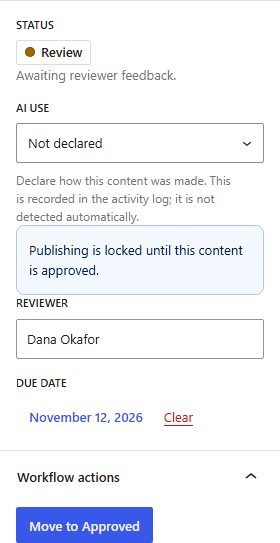
- Dana clicks Move to Needs Changes and confirms. Dana types what needs to change under Add a workflow comment and clicks Add comment. The comment shows in the activity history, and Sam gets an email about it.
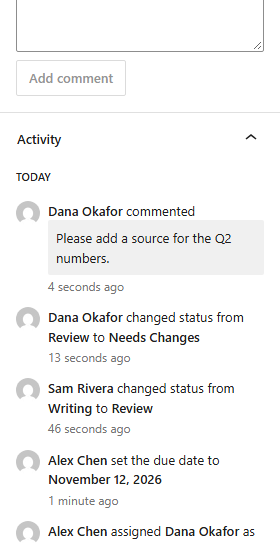
- Sam makes the change, clicks Move to Writing, then Move to Review.
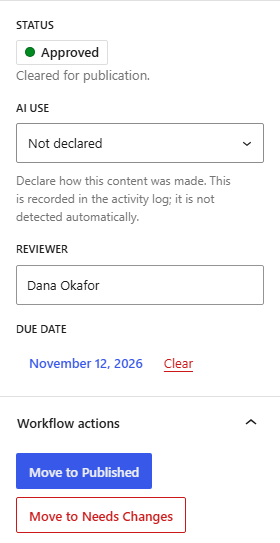
- Dana opens the post again, clicks Move to Approved and confirms with Approve. The publishing lock is gone.
- Alex opens the post and clicks WordPress’s Publish button, then Publish again in the pre-publish panel. The gate lets it through because the post is approved.
- Alex clicks Move to Published in the Editorial Workflow panel and confirms with Publish.
Publishing the post and closing the workflow are two separate steps. WordPress tracks whether the post is live. The workflow status tracks where it is in your editorial process. The plugin keeps the two apart, so you can always see both.
- The Activity section lists every step: who changed the status, who commented, who published and at which status.